What to have ready before an AI video analytics rollout — camera inventory, network readiness, zone planning, and the sequence that gets you live in days, not months.
Vengeea Security Team · 8 min read · Updated August 2026
Most delays in an AI video analytics rollout aren't caused by the analytics — they're caused by the site not being ready for it: an incomplete camera inventory, a network that wasn't planned for the added load, zones that were never clearly defined, or no agreement on who actually reviews an alert once it fires. This checklist covers the five things worth having in order before kickoff, plus a realistic day-by-day timeline for a warehouse-scale deployment.
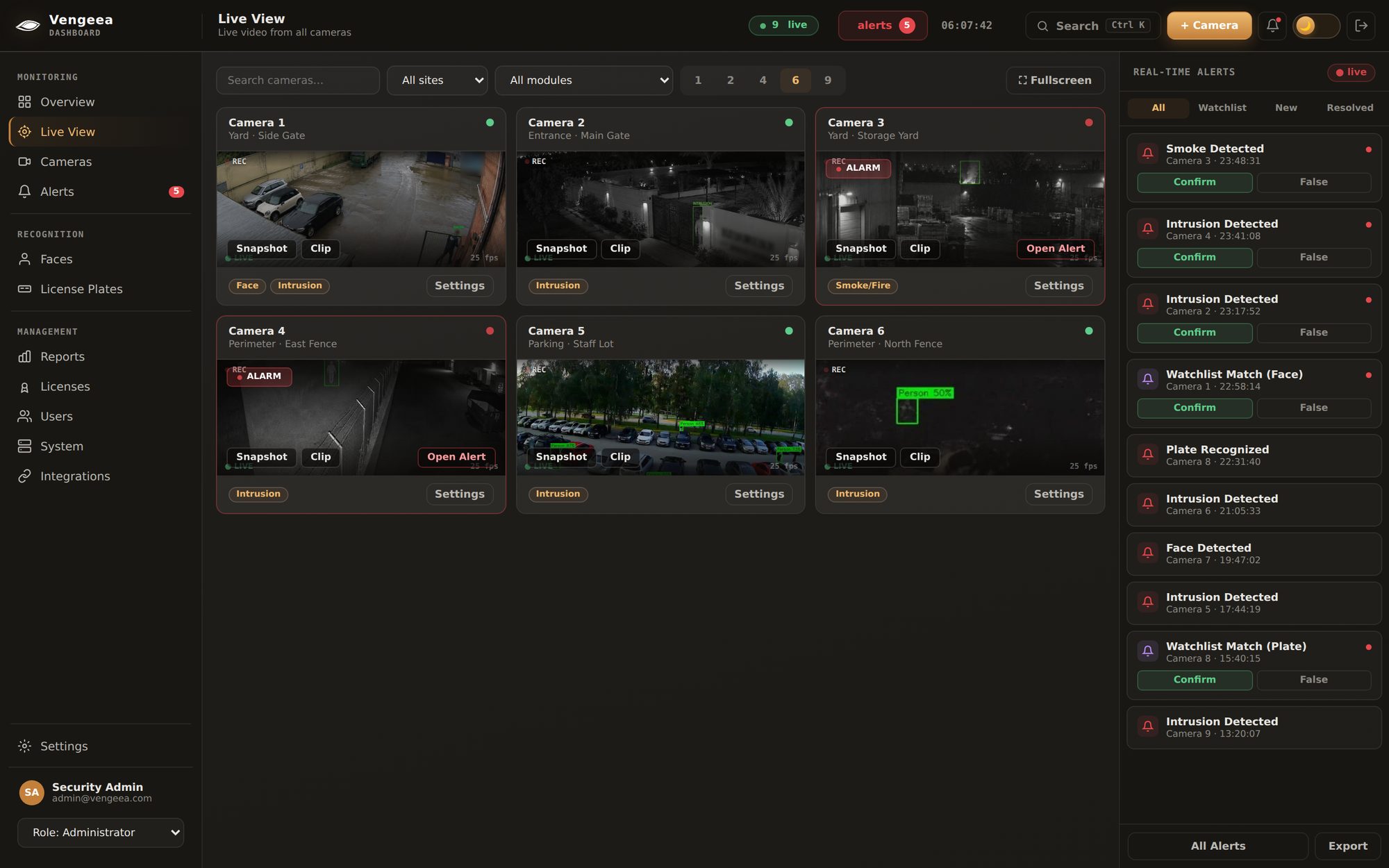
Six cameras, one screen. Perimeter, gates, yard and parking, each running only the modules it needs, with alerts in the rail on the right. Demo environment, footage from real cameras.
1. Camera fleet audit
Before anything else, get a real count of what's actually installed and working — not what's on the original procurement spreadsheet from three years ago. Warehouses in particular tend to accumulate cameras added in phases by different installers, which means brand and firmware consistency can't be assumed.
Fleet audit checklist
Total working camera count, by building/zone, cross-checked against what's physically installed
Brand and model per camera (Hikvision, Dahua, Axis, Bosch, Uniview and similar are common in warehouse fleets)
Resolution and frame rate per camera (affects both detection quality and bandwidth planning)
Physical placement mapped against actual coverage — dock doors, racking aisles, receiving/shipping, perimeter fencing, high-value cage areas
Known coverage gaps flagged now, not discovered during zone configuration
2. Network readiness
Warehouses are frequently large physical footprints with cameras spread across multiple buildings, and network infrastructure that was sized for recording, not for a second consumer reading every stream simultaneously. This step is where most avoidable delays actually happen.
Network checklist
Bandwidth headroom confirmed per camera — plan for the analytics appliance pulling a stream from every enrolled camera concurrently, on top of whatever the NVR already consumes for recording
Cameras on an isolated VLAN, or a documented plan for how the analytics appliance reaches them across existing network segmentation
PoE switch capacity confirmed if any new cameras are being added as part of this rollout (separate from the AI deployment itself, but often bundled into the same project)
Firewall rules mapped for the appliance's network path to each camera's RTSP port
A decision made on main-stream vs. substream usage per camera, so AI processing doesn't compete with the NVR's recording pipeline for bandwidth
3. Zone and rule planning
This is the step that determines whether the deployment produces useful alerts or noisy ones. A warehouse has fundamentally different security postures at different times — a forklift moving through an aisle during a shift is normal; the same aisle occupied at 2am with no shift scheduled is not. Zones and rules need to reflect that, camera by camera.
Zone planning checklist
Define what counts as a "restricted zone" after hours vs. during an active shift, per camera — the same physical area often needs two different rule sets
Draw polygon zones and tripwire lines on actual still frames from each camera, not a generic floor plan — camera angle and lens distortion both affect where a zone should actually sit
Identify high-value or high-risk areas that warrant tighter thresholds: cages, dock doors, perimeter fence lines, server or IT rooms
Confirm operating-hours schedules per zone (shift start/end, weekend patterns) so rules can auto-switch rather than requiring manual toggling
Set initial confidence thresholds conservatively and plan a tuning pass after the first week of live data — see the false-positive rate guide for how to evaluate that tuning pass properly
Sizing hardware for your camera count and module mix? Get the GPU, storage and network specs instantly.
Not every module needs to go live on day one, and starting narrow is usually the right call. For a typical warehouse, the starting pair is intrusion detection (restricted-zone and after-hours entry across perimeter and high-value areas) plus weapon detection (entry points, receiving areas, anywhere unscreened foot traffic enters the site). Facilities with high-ceiling storage halls — common in palletized or racked warehousing — often add fire/smoke detection early too, since early-stage smoke in a high-ceiling space is exactly the scenario traditional point smoke detectors are slowest to catch. License-plate recognition (LPR) is a common addition at gated yards or dock-scheduling entrances. Fight/aggression detection, theft detection and liquid-leak detection are modules currently in development at Vengeea and are not part of a live deployment today — plan around the modules that are actually live rather than the full eventual catalogue.
5. Stakeholder alignment
The most common reason a technically successful deployment underdelivers is that nobody clearly owns what happens after an alert fires. This is worth settling before go-live, not during the first real incident.
Stakeholder checklist
Named owner(s) for reviewing alerts during operating hours, and a separate plan for after-hours/unmanned periods
Escalation path defined per alert type — a weapon detection and a low-priority intrusion alert should not follow the same response protocol
Facility ops, security leadership and IT all briefed on what changes (camera streams now have a second consumer; alerts now route through a new dashboard/channel)
A decision on whether alerts route to a security operations center, an on-site supervisor's phone, an existing VMS, or some combination
A short internal announcement so shift staff aren't surprised by a new alert source appearing in their workflow
A realistic day-by-day timeline
This matches Vengeea's typical 1–3 day deployment window for a warehouse-scale site with the groundwork above already in place. The timeline compresses or extends mainly based on how much of the checklist above was done before kickoff — a site that walks in with a clean camera audit and network plan moves faster than one figuring those out live.
Kickoff call & camera/zone planningThe camera fleet audit and network readiness information gathered above is reviewed with the deployment team, and an initial zone and module plan is agreed for each camera.
Appliance install & stream enrollmentThe on-prem appliance is racked on the same network segment as the cameras. RTSP streams are enrolled — via ONVIF discovery or a manual list — and zones/rules are configured per camera against real still frames.
Pilot & go-liveModules run live with conservative thresholds while the team confirms alert routing works end-to-end. Any early false alerts get logged and used to tune thresholds; once the team is satisfied, the deployment is considered live.
Key takeaways
Before you schedule kickoff
A real camera fleet audit — count, brand, RTSP support, physical coverage — prevents surprises during install.
Network bandwidth and VLAN/firewall planning done ahead of time is the single biggest lever on how smooth kickoff goes.
Zones need to reflect actual shift patterns, not a generic restricted/unrestricted split — the same aisle can need two different rule sets.
Start with intrusion and weapon detection for most warehouses; add fire/smoke for high-ceiling halls; treat fight/theft/leak modules as roadmap items, not day-one capability.
Name who owns alert review and what the escalation path is before go-live, not after the first real incident.
A well-prepared site reaches first live detections in 1–3 days; most of what extends that timeline is groundwork that could have been done before kickoff.
Get started
Plan your warehouse deployment
On-prem, existing RTSP/ONVIF cameras, live in 1–3 days.